
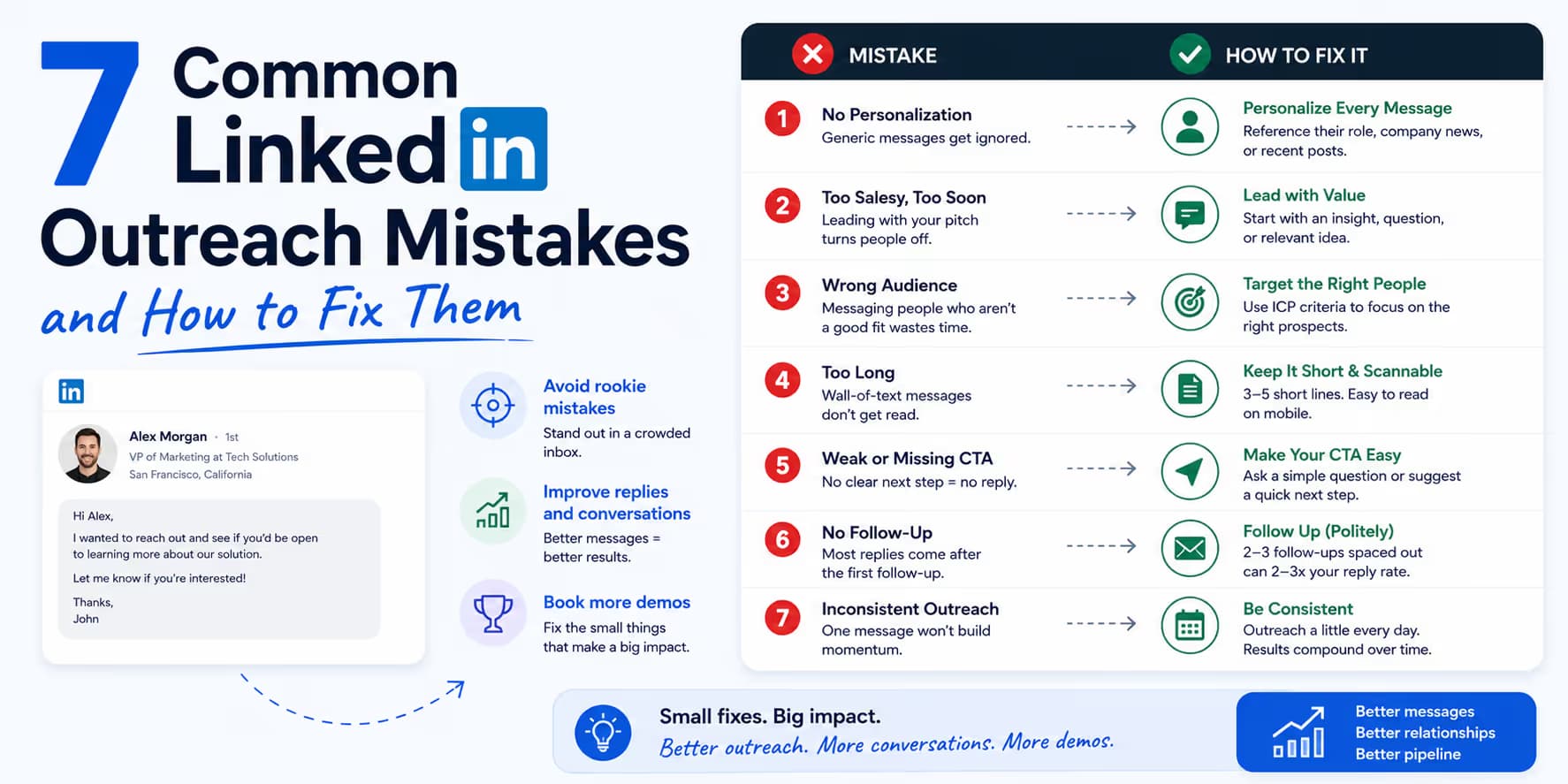
LinkedIn cold outreach still works for early-stage B2B founders, agency leaders, and enterprise sales teams who need pipeline and a way to test message-market fit. A tight, value-first sequence can skip email filters and land in front of people who actually use the platform.
The channel is also crowded. Cheap, high-volume automation has filled executive inboxes with generic pitches. Buyers now filter anything that sounds like a sales script, and LinkedIn watches accounts more closely than it used to. Aggressive, outdated tactics do not just produce weak reply rates. They can restrict or permanently ban the account.
How LinkedIn outreach changed
Most campaigns collapse because buyer habits and platform rules changed, and the copy did not. A few years ago, a decent offer and a relevant job title were often enough to start a conversation. Direct social selling was still new, so people were more willing to reply.
That is gone. Executives guard their time. If your copy reads like a brochure sent to 5,000 people, they will treat it as spam in a few seconds. LinkedIn also treats mass outbound as a threat to the feed. It is not only counting volume. It watches conversation quality, response speed, and negative feedback.
What LinkedIn outreach mistakes cost
In outbound, sloppy messages have a measurable cost. When a prospect gets a spammy or premature pitch, they can ignore it, delete it, or click "I don't know this person" and flag it.
If enough recipients pick the third option, LinkedIn flags the profile. After that, reputation usually gets worse in a few predictable ways:
- Quota reductions: Your weekly connection request allowance drops from 100 down to 30 or fewer.
- Search restrictions: You cannot view commercial profiles or run queries without a premium Sales Navigator upgrade.
- Outbox throttling: Your messages go to the recipient's "spam" or secondary folder instead of triggering push notifications.
- Temporary restrictions: You are locked out of the account and may need government-issued identification to reactivate.
The reputation score equation
LinkedIn assigns every active profile a hidden sender reputation score. Acceptance rates over 45% and real back-and-forth conversations raise it. Ignored requests and spam flags lower it. Keep quality high if you want the score to hold.
The 7 outreach mistakes and how to fix them
Audit your campaigns against these seven prospecting mistakes before you raise volume:
Mistake 1: Pitching inside the invitation note
The problem: Cramming the value proposition, company bio, and a scheduling request into the 300-character connection invite. That reads as a sales transaction. The prospect assumes accepting will start a string of automated pitches, so they click "Ignore."
The fix: Keep connection requests blank, or limit notes to a non-sales trigger observation under 120 characters. Blank requests get a 15 to 20% higher acceptance rate than a generic sales note. Connect first. Earn the right to talk after that.
Mistake 2: Sending Calendly/booking links in the first touchpoint
The problem: Asking an executive for a 30-minute block when they do not know who you are, what you do, or why they should care. A meeting ask in the opening message is a high-friction request, so conversion stays low.
The fix: Change the call to action from a calendar booking to a small conversational ask. Offer a resource, an idea, or a 90-second loom video. ("Open to checking out the 1-page PDF blueprint, or too busy right now?") Once they say yes, booking the call is easier.
Mistake 3: Sending massive walls of text
The problem: Long, multi-paragraph messages with feature lists, company history, and testimonials. A dense block looks like homework. Most executives archive it.
The fix: Write Slack-style messages under 80 words. Use two or three short sentences with white space between them. A short note is easier to read on a phone and asks less of a busy buyer.
Mistake 4: Relying on public plug-and-play templates
The problem: Copying templates from sales blogs. High-value prospects see those same templates from hundreds of SDRs. They recognize the sentence shapes, so the outreach feels lazy and automated.
The fix: Keep the copywriting frameworks, but use your own vocabulary. Name a pain that is specific to their niche, in the words people in that niche actually use.
Mistake 5: Under-personalizing and static lead lists
The problem: Exporting a static list of 1,000 job titles and sending identical copy. That ignores active initiatives, department updates, and live triggers.
The fix: Clean and segment lists. Use live intent triggers such as new hiring posts, company restructures, product launches, or recent content engagements to shape the message. A real trigger makes the note feel timely.
Mistake 6: Rapid, bot-like messaging cadences
The problem: Automated follow-ups every 24 hours, or at exact intervals (for example, precisely at 9:00 AM every Tuesday). That looks mechanical to the platform and annoying to the prospect.
The fix: Leave space between touches. Wait at least three to five business days between follow-up steps. Randomize delays between 90 and 300 seconds so pacing looks human. Keep sequences under 4 steps.
Mistake 7: Leaving stale pending invitations in your outbox
The problem: Letting thousands of unaccepted connection requests sit in the outbox for months. A large pending pile tells LinkedIn you are blasting strangers, which leads to account limits.
The fix: Flush pending invitations on a schedule. Use a 14-day rule: if a prospect has not accepted after two weeks, retract the request. Keep pending invites under 150.
Before and after message rewrites
Moving from a transactional pitch to a short, peer-level note changes how the same outreach lands:
"Hi [First_Name], hope your week is off to a great start! I'm an AE at LeadGenPro. We are an award-winning, state-of-the-art lead generation agency that helps B2B SaaS companies scale pipeline. We use advanced machine learning algorithms to source high-quality email lists and manage cold campaigns. C-level executives choose us to increase demo bookings by 30%. I'd love to see if you have 15 minutes next Tuesday for a demonstration? You can book directly on my Calendly here: [Link]"
"Hi [First_Name], noticed you guys recently expanded your AE team at [Company_Name]. Congrats on the growth.
Usually, onboarding new reps makes lead list cleaning and duplicate lead scrubbing a major focus for revenue leaders.
We put together a brief, 3-step blueprint showing how to automate list cleansing safely inside Slack. Open to checking out the outline?"
Technical safety limits and deliverability rules
To keep a LinkedIn account healthy while you scale, stay inside the platform's usual limits. Hundreds of connection requests a day is a fast way to get restricted. Narrow targeting and better conversations beat raw volume.
| Technical metric | Recommended limit | Warning threshold | Safe execution |
|---|---|---|---|
| Weekly connection invites | 80 - 100 / week | > 120 / week | Space requests evenly across business days. Stop immediately if you hit a CAPTCHA. |
| Daily direct messages (DMs) | 30 - 40 / day | > 60 / day | Limit DMs to active 1st-degree connections. Keep content highly contextual. |
| Pending invites in outbox | < 150 total | > 250 total | Retract outstanding connection requests that have been ignored for more than 14 days. |
| Automation time delay | 90 - 300 seconds | < 30 seconds | Randomize delay timing between consecutive actions to simulate natural human pacing. |
Case study: rebuilding a restricted account to a $15k pipeline
Sarah was a solo founder scaling an AI-based customer success startup. She ran a high-volume outbound sequence with a standard automation tool, sending 100 connection requests daily with a pitch note and a scheduling link.
Within three weeks, her connection acceptance rate dropped below 18%, her active response rate hit zero, and LinkedIn restricted her account.
She rebuilt the campaign:
- Step 1: Account cool-down: She halted all automation for 7 days so outstanding pending requests could cool.
- Step 2: Outbox purge: Sarah manually retracted 450 stale pending invitations older than 14 days, bringing her pending list down to 40.
- Step 3: Copy audit and rewrite: She threw out her product-centric 250-word sales templates. She rewrote the sequence as a 70-word peer question.
- Step 4: Quality and intent sourcing: She swapped the large directory list for live intent triggers, targeting only companies that recently announced funding or posted specific hiring requirements.
Results showed up quickly. Sarah's connection acceptance rate jumped to 62%, and her positive response rate hit 34%. Staying under platform limits, she booked 18 qualified demos and built a $15,000 MRR pipeline in under 60 days, without another restriction.
Use this as an outreach quality checklist
Use the mistakes above as a pre-send review. If the message is generic, too early, or hard to answer, fix that before increasing volume.
Frequently asked questions
Watch for connection acceptance dropping below 20%, a CAPTCHA on every invitation, or messages landing in the "Other" inbox. If any of those show up, pause campaigns and clear pending invites from your outbox.
Yes, but only if you have a real trigger or a specific observation. A generic note like "Hi C-Level, saw you are in B2B SaaS and wanted to connect!" converts worse than a blank request. If you do not have a specific trigger, send a blank connection request.
Be honest and keep the pressure low. A response like: "Hey [Name], fair question. I do run a company that automates outbound safely, but I reached out because your team's expansion caught my eye and I wanted to share our checklist peer-to-peer. No hard pitch here. Completely up to you if you want to look at the PDF!" defuses the question and keeps the conversation usable.