
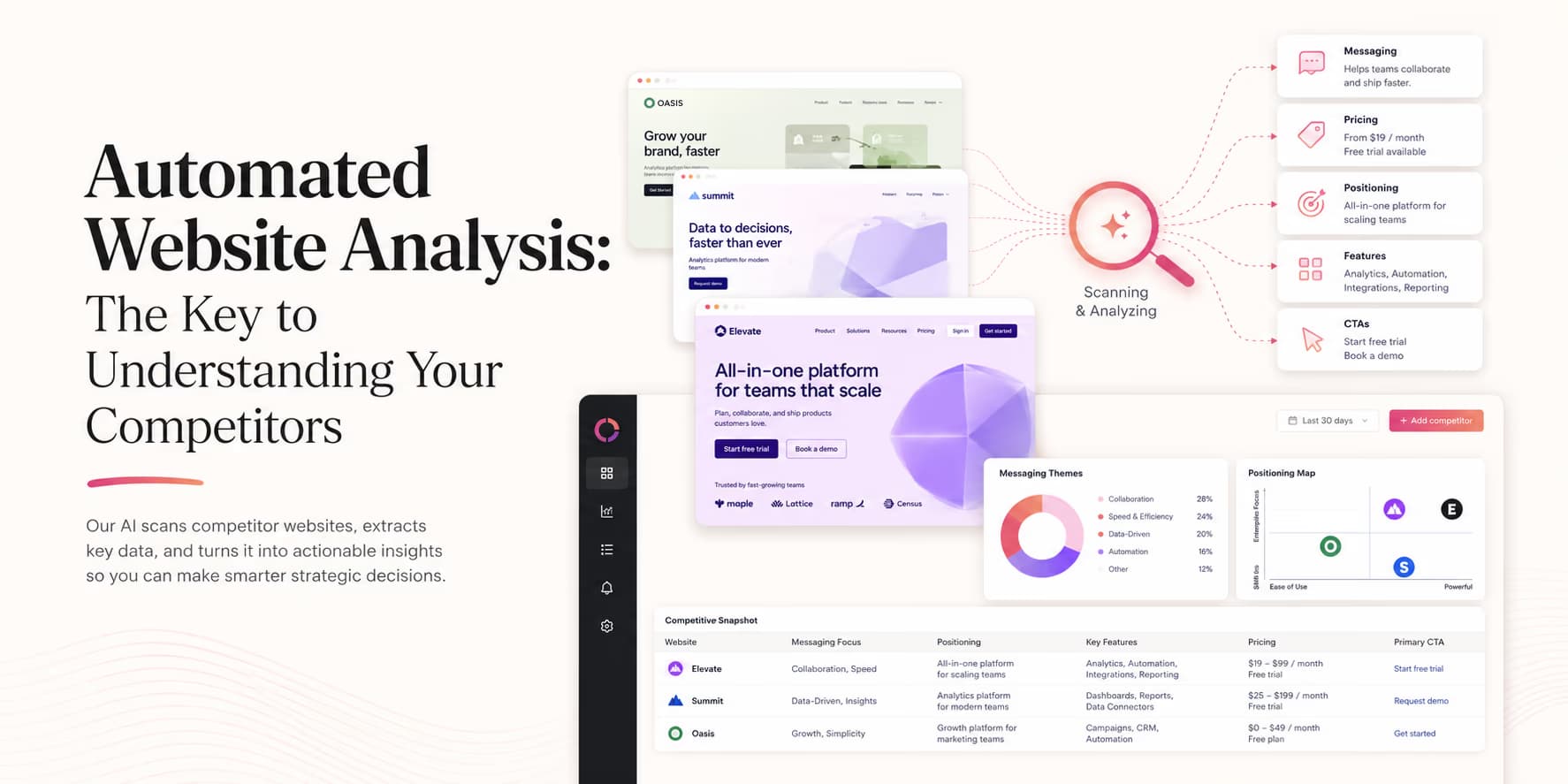
B2B sales markets are highly competitive. New platforms enter the market constantly, existing competitors update their feature lists, and pricing models change. To position your product effectively, your sales team must maintain an accurate understanding of competitor offerings.
Most sales teams track competitors manually. Product managers review competitor landing pages once a quarter and copy-paste updates into static documents. Because this process is slow, sales battlecards are often outdated, resulting in reps using old pricing details during sales calls.
The solution is automated website analysis. By deploying AI crawlers to monitor competitor domains, you can extract pricing changes, product releases, and value positioning copy programmatically.
Omentir supports this discovery workflow, crawling target websites to identify active software installations and competitor usage. The rest of this post covers how to build an automated competitor analysis pipeline.
The goal is not to spy on competitors or create attack copy. The goal is to keep your own positioning honest and current. If your sales team still says a competitor lacks a feature they launched six weeks ago, you lose credibility. If your messaging ignores a competitor's new segment focus, you miss a market signal. Automated monitoring helps you notice these changes before they show up in lost deals.
Good competitor intelligence should answer practical sales questions: what changed, why it matters, which buyer segment is affected, how our positioning should adjust, and what reps can safely say. If the system only collects screenshots, it is not intelligence yet. It is a folder.
What you should actually monitor
Start with the pages that change buyer perception. You do not need to crawl every page on a competitor's domain. Monitor the pages that sales teams reference, prospects compare, or product marketers use to infer strategy.
Useful monitoring targets include:
- Homepage and product pages: These show the competitor's primary positioning and market focus.
- Pricing pages: These reveal packaging, plan limits, free trial changes, and enterprise motion shifts.
- Feature pages: These show which workflows the competitor is emphasizing or de-emphasizing.
- Integration pages: These reveal ecosystem priorities and potential switching or compatibility angles.
- Security and compliance pages: These often indicate movement toward larger customers.
- Case studies: These reveal target segments, buyer roles, and outcomes the competitor wants to own.
Do not monitor everything at the same frequency. Pricing and homepage pages may deserve weekly checks. Documentation and case studies may only need monthly review. A focused crawler produces fewer false alerts and a much better signal-to-noise ratio.
Architecture of a competitor analysis engine
A competitor analysis engine uses web crawlers to monitor target domains and extract specific structural sections.
A professional competitor tracking pipeline consists of three steps:
- Monitoring: Scheduling regular crawls of competitor homepages, feature listings, and pricing pages.
- Extraction: Isolating pricing tables, product headers, and integration lists.
- Comparison: Running text through LLM parsers to identify new updates and log changes.
Add a fourth step: interpretation. A pricing page changing from three plans to two plans is a fact. The sales implication may be that the competitor is simplifying self-serve buying, moving lower-end customers away from the product, or making room for enterprise packaging. The crawler can detect the change, but your team needs a short interpretation layer before updating sales copy.
A useful competitor event should be stored like this:
Competitor: {name}
Page: {url}
Change detected: {pricing | feature | positioning | integration | proof}
Before: {short_previous_text}
After: {short_new_text}
Sales impact: {one_sentence}
Recommended action: {battlecard_update | no_action | human_review}
This structure prevents the system from flooding your team with raw diffs. Reps do not need every word that changed. They need the practical implication and whether their talk track should change.
For details on web crawling infrastructure, see our analysis of modern outbound data stacks.
Crawling pricing and feature grids automatically
Pricing updates are useful triggers for competitive campaigns. If a competitor increases their pricing tiers or reduces their plan capabilities, their existing customers will begin looking for alternatives.
Your crawler targets competitor pricing URLs daily, converting pricing tables into clean JSON objects.
If the system identifies a change in plan rates or feature parameters, it alerts your sales operator and updates comparison materials.
Pricing pages are tricky because they often include hidden conditions: annual discounts, usage limits, add-ons, fair-use language, onboarding fees, or enterprise-only features. Your parser should not reduce pricing to a single number. It should capture plan names, billing period, stated limits, included features, excluded features, trial terms, and any language that says "contact sales."
Ask the parser to separate facts from interpretation. "Competitor removed the public price from the team plan" is a fact. "Competitor is now too expensive" is an interpretation that may or may not be true. Keeping those fields separate makes your battlecards more trustworthy.
Pricing changes can create useful sales prompts, but only when used carefully. Do not tell a prospect "your vendor got worse" unless you can point to a public change and explain why it matters to their workflow. A better angle is: "We noticed many tools in this category are moving more features behind higher tiers; are you evaluating cost predictability this quarter?"
Parsing value propositions and messaging changes
Analyzing how competitors pitch their features reveals their focus markets. If a competitor changes their landing page copy from "outbound email scaling" to "enterprise CRM data cleaning," they are shifting their targeting.
Your crawler extracts competitor headers and value propositions, running them through LLM classification models to isolate messaging trends.
This analysis helps you identify market gaps and refine your sales positioning.
Positioning changes matter because competitors usually update messaging before the market fully sees the strategic shift. If a tool that once sold to startups starts emphasizing security, procurement, and compliance, it may be moving upmarket. If it starts highlighting templates and speed, it may be chasing self-serve adoption. Those shifts affect who you should target and how you should differentiate.
Track these language patterns:
- Buyer role: Are they speaking to founders, sales leaders, RevOps, marketers, agencies, or enterprise IT?
- Primary pain: Are they emphasizing cost, speed, compliance, personalization, data quality, or automation?
- Proof type: Are they using customer logos, metrics, testimonials, technical claims, or comparison pages?
- Market category: Are they trying to define a new category or attach themselves to an existing one?
Use those patterns to sharpen your own message, not to mimic theirs. If every competitor claims "AI-powered automation," you may win by being more specific: safer LinkedIn pacing, human-reviewed drafts, ICP-fit lead discovery, or a workflow built for founder-led outbound.
Ethical crawling boundaries
Automated analysis should stay inside public, respectful boundaries. Monitor pages that anyone can visit in a browser. Respect robots.txt. Avoid login areas, private documents, customer portals, gated resources, or endpoints that were not intended for public consumption. Keep crawl frequency reasonable so you are not creating load for another site.
Also avoid turning uncertain crawler output into hard claims. Website detection can be wrong. Copy parsing can miss context. A pricing table may render differently by region. Treat automated analysis as a signal for review, not as a license to make aggressive public comparisons.
A good operating rule is: if you would not be comfortable showing the prospect exactly where the information came from, do not use it in sales copy.
Intelligence rule: focus on real flaws
Do not copy competitor messaging. Instead, configure your sales battlecards to highlight features they do not support, such as open API access or hosted Model Context Protocol (MCP) servers.
Translating crawled data into sales battlecards
Raw website crawls are too complex for reps to use during sales calls. Your system must convert crawled text into concise sales battlecards.
A sales battlecard should contain three core sections:
- Quick Summary: A brief description of the competitor's product focus and pricing tiers.
- Strengths: Where the competitor tool performs well.
- Weaknesses (Gaps): Specific features they lack (e.g. strict LinkedIn connection request pacing delays).
Add four more fields to make battlecards useful during real conversations:
- Best-fit customer: The type of buyer the competitor seems designed for.
- Likely objection: What a prospect using that competitor may say when you position your product.
- Fair response: A truthful answer that respects the competitor while explaining your advantage.
- Proof to show: Screenshot, workflow example, demo moment, or customer evidence that supports your claim.
The "fair response" field matters. Sales teams lose trust when battlecards train them to exaggerate. A better battlecard says, "This competitor is strong for teams that need X. We are stronger when the buyer needs Y." That helps reps qualify instead of forcing every deal into the same narrative.
For comparison copy ideas, see our deep dive comparing Lusha and Omentir features.
Grounding outreach copy in competitor strengths and weaknesses
Once competitor battlecards are generated, you can use them in outreach campaigns. When your crawler identifies a prospect using a competitor tool, you can trigger a comparison pitch.
Omentir helps manage this campaign flow, drafting connection requests that highlight comparison details and routing them to a review queue for approval.
Keep competitor-based outreach restrained. The message should not open with an attack. It should open with the buyer's workflow and use the competitor context only if it is relevant. If you know a prospect uses a database tool, the useful angle may be active prospect discovery versus static contact lists. If a prospect uses a sequencer, the useful angle may be message quality and safe pacing. The competitor is context, not the headline.
A safer message structure looks like this:
Hi Priya, saw your team is scaling outbound this quarter.
Many teams already have a contact database, but still struggle with deciding
which LinkedIn prospects are actually worth sending.
Omentir focuses on ICP-fit discovery, human-reviewed messages, and paced LinkedIn outreach.
Worth comparing how you are handling lead quality before sequences start?
This does not disparage anyone. It names a common workflow gap and positions your product around that gap. That is the difference between competitive intelligence and cheap comparison copy.
SOP: the competitor intelligence checklist
Set up competitor tracking using these steps:
- Step 1: List your core competitor domains.
- Step 2: Configure crawlers to scan their pricing and feature URLs monthly.
- Step 3: Use an LLM parser to extract changes in pricing and features.
- Step 4: Update sales battlecards and comparison copy in Omentir.
Add a review rhythm so the system stays accurate:
- Weekly: Review high-priority pricing, homepage, and comparison page changes.
- Monthly: Refresh battlecards and remove claims that are no longer supported.
- Quarterly: Reassess which competitors matter based on lost deals, prospect mentions, and market movement.
- After every lost deal: Add the competitor objection to the battlecard if it appears repeatedly.
Keep a human approval step for any battlecard change that affects customer-facing copy. Automated crawlers can find differences, but positioning is a judgment call.
Omentir resolves these comparison variables, keeping your outbound campaigns current as the market changes.
Keep competitive intel current
Outbound outreach is most effective when it is timely and relevant. By automating competitor website crawls, you ensure your sales battlecards remain accurate.
The value is not in collecting competitor trivia. It is in noticing a pricing page change, a new integration, or a support complaint, then writing one sentence a buyer would recognize as true. Trivia-filled notes still read as research theater.
Frequently Asked Questions
It is the practice of setting up AI web crawlers to scan competitor landing pages, pricing grids, and documentation regularly, extracting updates to keep your sales intelligence current.
Configure your crawler to target the competitor's pricing URL, extract the text tables, and run an LLM parser to detect differences in plan names or costs.
Omentir helps you identify which competitor tools a prospect uses by scanning their website headers, allowing you to trigger customized comparison pitches.
Competitor monitoring should stay limited to publicly accessible pages, respect robots.txt rules, and run at reasonable rates. Avoid private areas, credentialed pages, or any data that was not meant for public viewing.