
Your LinkedIn profile is the first thing a B2B decision maker checks after a connection request or a cold message. They click your name and ask: who is this person, do they understand my industry, and is this a sales trap?
If the profile reads like a generic sales pitch, or like a representative hunting for a meeting, connection acceptance often sits below 20 percent. To raise outbound conversions, treat the profile as a B2B landing page. A resume that lists your quota does less work than a page that explains the problem you help with and why you are a credible peer.
Why your LinkedIn profile behaves as a B2B landing page
In traditional marketing, a landing page converts traffic by removing distractions, proving authority, and pointing to one call to action. On LinkedIn, your profile does the same job. The cold message is the ad copy. The profile is the page that checks whether the ad was honest.
To convert cold leads, the profile has to respect how buyers actually read:
- Shift focus from self to prospect: Do not lead with personal sales achievements, quota attainments, or business development awards. Outline the operational challenges your prospects face and the metric outcomes your organization delivers.
- Lead with peer-level authority: B2B decision makers, especially founders, CEOs, and technical directors, prefer talking with other leaders and operational peers, not sales reps. Position yourself as a professional peer with subject-matter expertise.
- Make the next step obvious: Make it easy for a visiting prospect to learn what you do, review solid social proof, and open a low-friction resource without leaving LinkedIn.
The Pitchless Headline Boundary
Never use sales-heavy headlines like "Helping B2B SaaS book 20 demos." They read as "sales representative" and push prospects to decline. Write headlines that name your operational role and the core business metrics you manage.
The high-converting headline formula
Your headline is the single most visible element of your profile. It appears next to your name in search results, connection request notifications, feed posts, and group discussions. It must state clearly what you do, who you serve, and why it matters in under 120 characters.
Use this three-part framework:
Three role-specific examples using this formula:
"Founder @ [CompanyName] - Building secure, API-first integrations that eliminate data synchronization lag | B2B Infrastructure Architect"
Why it works: Positions the founder around engineering authority and the technical outcome, completely avoiding sales jargon.
"Growth @ [CompanyName] - Fixing B2B deliverability systems so cold outreach reaches the primary inbox | Deliverability Expert"
Why it works: Focuses on the core business challenge (inbox delivery) and the expert capacity, inviting curiosity from sales leaders.
"Ops Director @ [CompanyName] - Optimizing B2B sales automation pipelines to protect account safety and throttle bounce rates"
Why it works: Emphasizes risk management and operations efficiency, which matters to buyers who care about account safety.
Drafting a B2B About section sales narrative
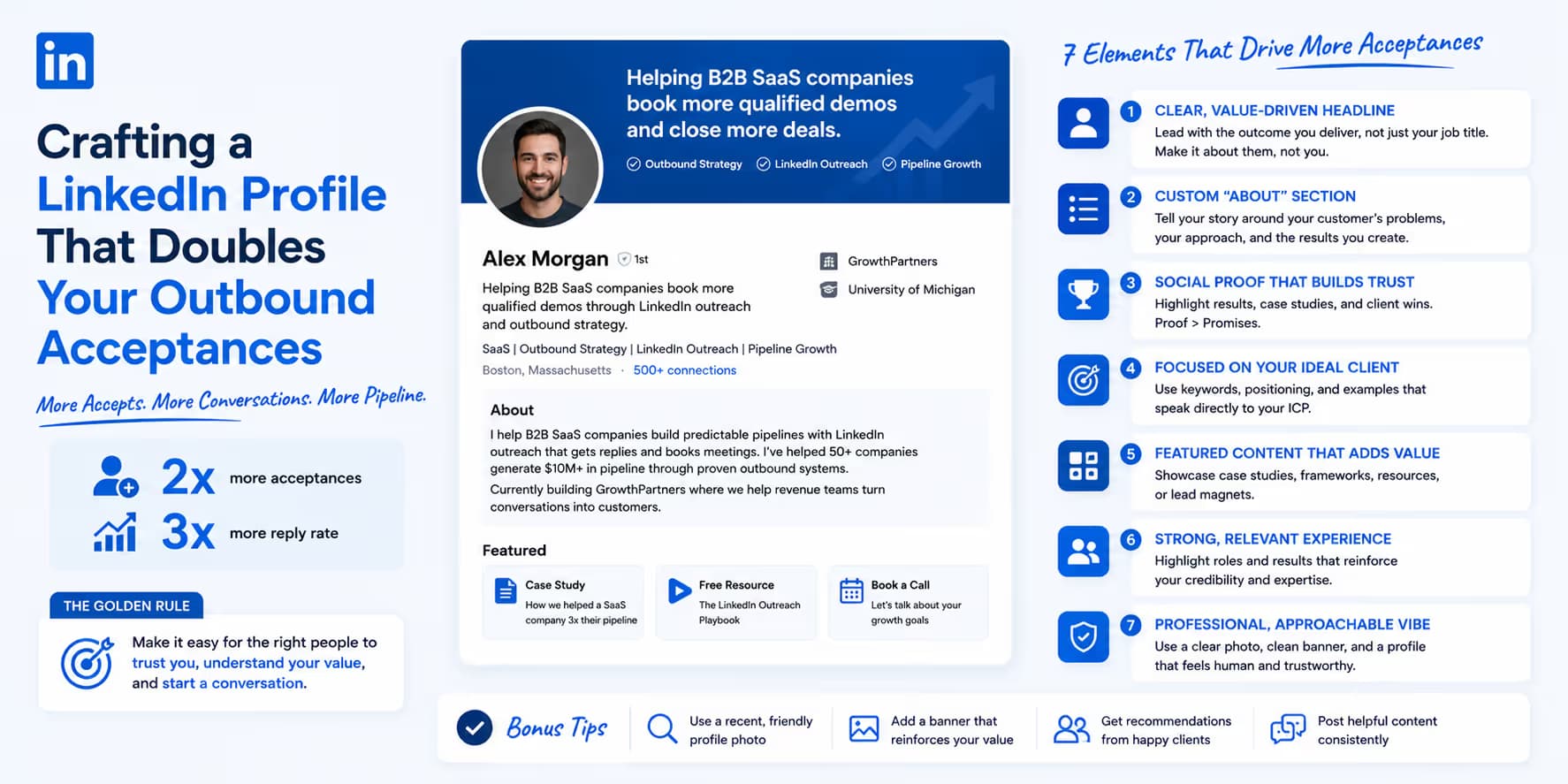
Your About section should not be a dry, chronological listing of past job roles. Frame it as a B2B sales narrative: the prospect's daily pains, the outcomes you deliver, credibility with clear milestones, and a low-pressure call to action.
A B2B About section that converts usually follows this four-part structure:
- Part 1: The Context Trap (0-100 words): State a controversial or highly visible operational challenge in your industry. Frame it as the primary blocker preventing companies from scaling. (e.g., "Most B2B outreach campaigns are completely blocked by email providers before a single buyer reads the copy...")
- Part 2: The Core Thesis (100-200 words): Explain why traditional methods fail, and present your core operational thesis. Focus on how you approach the problem differently.
- Part 3: The Authority Proof (200-350 words): List three bulleted metric achievements or milestones that validate your thesis. Use clear, unembellished numbers to prove your claims.
- Part 4: The Frictionless CTA (350-400 words): Close with a low-friction call to action. Do not ask for a formal meeting or calendar slot. Instead, invite them to send a DM or check out a pinned resource.
Setting up social proof and CTA features
LinkedIn's **Featured** section is prime real estate. It sits directly below your About section and lets you pin visual links, PDFs, articles, and media. This is the main way to move a visiting prospect further into your sales funnel.
To set up Featured for B2B lead conversion:
- Pin a 90-Second Value Video: Record a brief, un-gated loom video outlining a custom operational workflow or tearing down a common industry mistake. Make sure the thumbnail is clean and professional.
- Upload a Peer Case Study PDF: Pin a highly readable, 2-page PDF case study detailing how you helped a similar peer organization resolve their core bottlenecks, highlighting clear metric outcomes.
- Include a Frictionless Calendar Link: If you include a scheduling link, be sure to frame it around a value-first, non-sales audit or peer discussion, completely removing the "hard sales trap" connotation.
Featured section setup guide
To convert visiting cold prospects, limit Featured to no more than three items. Too many links causes choice overload and weakens the main proof:
- Item 1: A high-quality un-gated resource (PDF checklist or video teardown).
- Item 2: A detailed B2B peer-group client success story.
- Item 3: A conversational call to action (a link to an audit or direct profile DM invite).
The LinkedIn profile optimization checklist
To make the profile function as a B2B landing page, audit your account assets against this checklist:
| Profile Asset | Optimization Action Required | Conversion Impact |
|---|---|---|
| Profile Photo | High-resolution headshot with professional lighting, clear eye contact, and neutral background. Avoid casual selfies or cropped group photos. | Immediate Trust Build |
| Banner Image | Clean, branded graphic displaying a single, concise value proposition or your company logo against a neutral background. Avoid generic stock photos. | Brand Professionalism |
| Headline | Apply the three-part formula: Role + Metric Value Hook + Niche Keyword. Avoid sales-heavy pitches. | Connection Accept Rates |
| About Section | Structure as a 4-part sales narrative. Focus on prospect pain points and metric proof instead of career history. | Engagement & Inquiry |
| Experience Section | Highlight metric achievements, case studies, and corporate milestones under your current role. Remove ancient, irrelevant history. | Credibility Verification |
Profile copy examples you can use
A profile optimization guide should leave the reader with usable copy, not only principles. Below are simple before-and-after patterns for the parts of your profile that prospects inspect after receiving your connection request.
- Headline before: Founder at Acme. Headline after: Helping B2B SaaS teams turn warm LinkedIn conversations into qualified demos.
- About opener before: I am passionate about sales and automation. About opener after: I work with lean B2B teams that have a strong offer but need a repeatable way to start conversations with the right buyers.
- Featured section before: A company homepage link with no context. Featured section after: A short case study, a clear demo page, and one proof asset that shows the outcome your outreach claims.
The profile should answer three questions quickly: who you help, what problem you solve, and why the prospect should trust you enough to accept the request. If a sentence does not support one of those three questions, remove it or move it lower on the page.
Quick audit before you send invites
Before sending a new batch of requests, open your profile as if you were the buyer. In ten seconds, can they understand who you help and why your request is relevant? If not, rewrite the headline, first line of the About section, and featured proof asset before increasing outreach volume.
A strong profile creates continuity. The request creates curiosity, the headline confirms relevance, the About section explains the problem you solve, and the featured section proves you have helped someone similar. When those pieces match, acceptance rates rise because the prospect does not need to guess your intent.
Frequently asked questions
Yes. Creator Mode lets you display custom hashtags, highlights your Featured section, and replaces the default "Connect" button with "Follow" for non-targeted traffic, while preserving the "Connect" capability for personalized outreach campaigns.
Aim for at least three to five recommendations from direct professional peers or clients. Those recommendations should mention specific metrics, project outcomes, and professional credibility rather than generic politeness.
Yes. Your experience section is a sales credibility asset, not an exhaustive background check. Remove old student roles, internships, or non-B2B roles that do not support your current profile.
Combine a clear landing-page profile with a safety-first sales outreach tool like Omentir. Targeted campaigns, daily safety throttles, and personalized messages let you raise connection acceptances without putting profile health at risk.