Steal Customers
How Omentir Steal Customers finds buyers who comment on competitor company and employee posts, scores them as leads, and runs AI LinkedIn outreach with real engagement context.
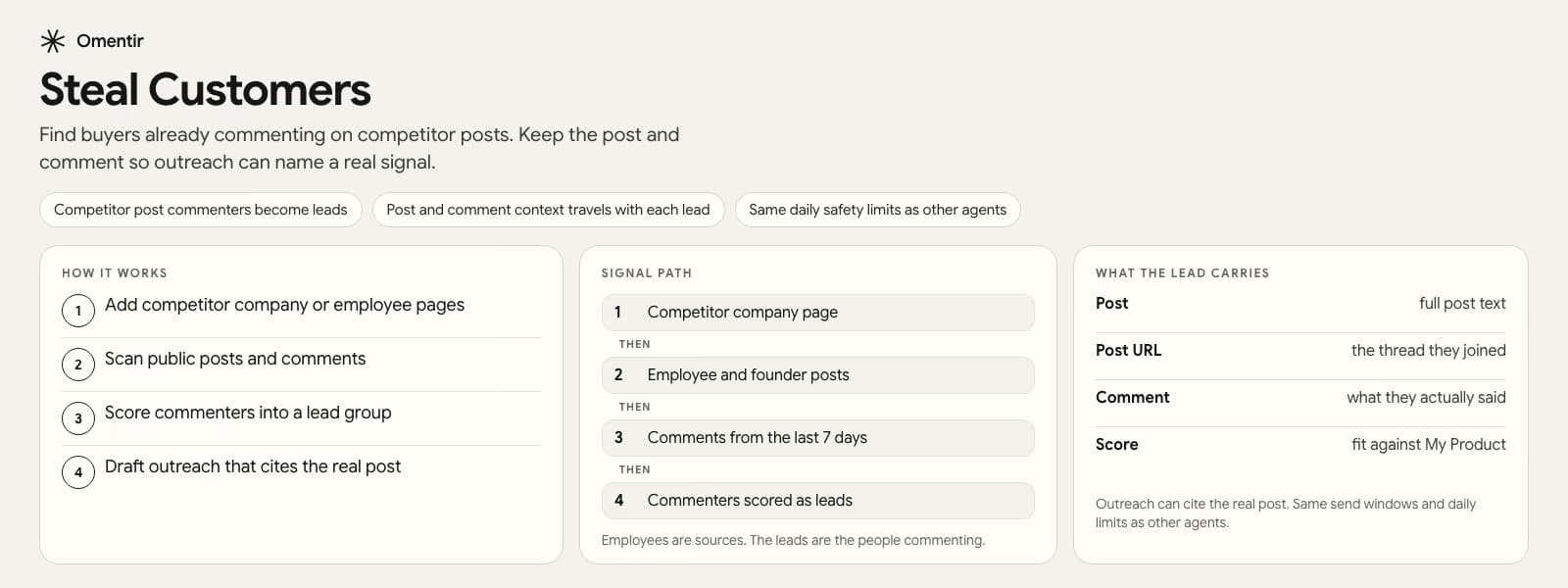
What Steal Customers does
Steal Customers is an Omentir agent mode built for a specific outbound motion: people who already engage with your competitors are often warmer than cold ICP lists. Instead of starting from a static database, the agent uses competitor LinkedIn company pages and optional founder or employee profiles as signal sources.
Discovery finds relevant employees, scans their posts, and promotes commenters as buyer leads. Each lead can carry engagement context such as post text, post URL, and the comment that made them interesting. That context is what makes the first message feel specific instead of generic.
How the workflow runs
You configure a Steal Customers agent with competitor company LinkedIn URLs and, when useful, founder or employee profile URLs. Omentir treats those sources as the signal set. The agent does not ask you to rebuild a full ICP filter the way a classic lead finder does.
Once discovery runs, commenters land in a lead group with the engagement context attached. AI outreach can then draft connection requests and follow-ups that reference the real post and comment, subject to your campaign settings, send windows, and daily safety limits.
- Signal sources: competitor company pages plus optional founder or employee profiles
- Lead quality signal: public engagement with competitor content, not purchased contact rows
- Outreach input: post and comment context for personalization
- Safety: same LinkedIn pacing, send windows, and daily limits as other Omentir agents
When Steal Customers is the right motion
Use Steal Customers when your market has clear competitors with active LinkedIn presence, and buyers already leave comments, questions, or reactions on those posts. It is especially useful for founders and small teams who want intent-shaped leads without buying another contact database.
It is less useful when competitors are silent on LinkedIn, when engagement is mostly spam, or when you need strict title and industry filters before any outreach. In those cases, start with a classic lead finder and use Steal Customers as a parallel signal, not the only one.
What you need before you start
Fill My Product so outreach understands what you sell. Connect a LinkedIn account you are allowed to use for outbound. Create a Steal Customers agent, add competitor URLs, and keep at least one agent active if you care about the Minimum Booking Guarantee measurement rules.
You can also create and manage Steal Customers agents from Claude, ChatGPT, Grok, Cursor, or other MCP and REST operators. Human setup lives on the MCP Server and For Agents pages.
How a first week with Steal Customers should look
Pick two or three competitors that actually post, not every logo in your category. Create one Steal Customers agent, let discovery run, and review the first batch of commenters by hand. If the comments are mostly vendors pitching each other, the signal is weak and you should change sources before you write outreach.
Once a handful of commenters look like buyers, send a small campaign that names the post they touched. Measure replies, not how many commenters the agent found. Volume without a usable comment is just another cold list.
What Steal Customers will not do
It will not invent buyer intent on a silent competitor page. It will not replace title and industry filters if your offer only works for a narrow role. And it will not stay useful if you treat every commenter as qualified. The motion works when you keep the source list short and throw away obvious noise.
Frequently Asked Questions
No. Steal Customers is a separate agent mode focused on competitor engagement. Classic lead finders still use roles, industries, locations, and keywords. Many teams run both.
Leads come from people who engaged with competitor posts, and Omentir can store post and comment context so outreach can reference a real signal instead of a template-only opener.
Yes. After My Product is complete and LinkedIn is connected, an MCP or REST agent can create an agent with mode steal_customers and your competitor LinkedIn URLs.
Steal Customers uses the same workspace send windows, daily limits, and human-paced automation rules as other Omentir outreach. You remain responsible for platform rules and the accounts you connect.
Put this feature to work on your LinkedIn account
Connect LinkedIn, fill My Product, and run the motion end to end in one workspace.