
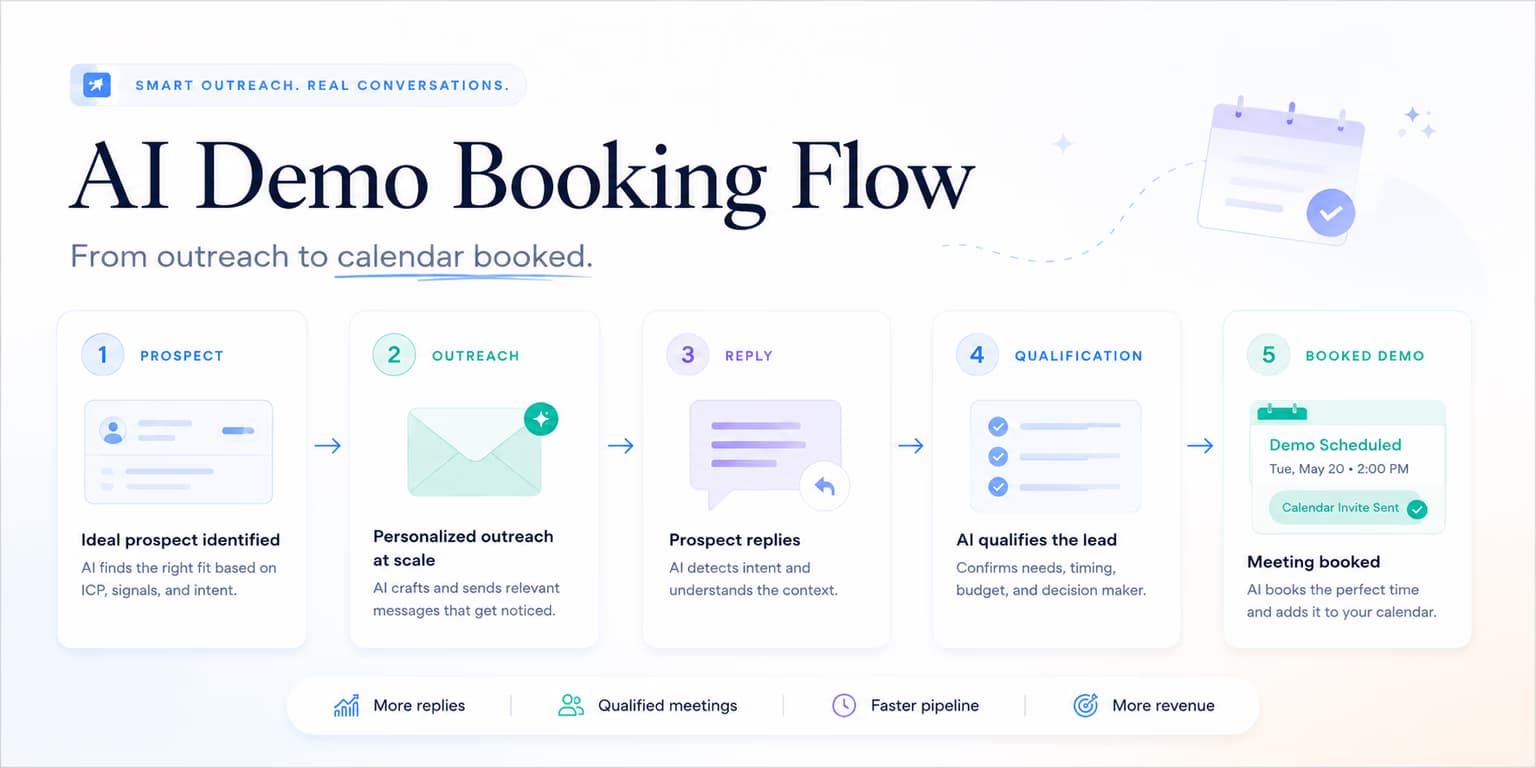
One of the easiest places to lose a B2B deal is the gap between a positive reply and a booked meeting. A prospect replies, "sounds interesting," "how does it work?" or "send more info," and the seller responds hours later with a calendar link that feels disconnected from the question. The thread cools before the meeting exists.
Speed is only part of it. A fast but lazy calendar link can also kill momentum. If the buyer asked a real question and you skip straight to "book time here," they may feel pushed. Demo booking works when the system recognizes the type of reply, answers just enough, and offers the next step at the right moment.
An AI demo booking flow should help with that judgment. It can classify replies, draft short responses, surface interested conversations, and remind the team when a prospect needs follow-up. But it should not turn every reply into a calendar push. The booking link is useful only after the conversation has earned it.
Omentir helps manage this pipeline by collecting LinkedIn replies in one inbox, supporting AI-drafted replies, and keeping outreach paced. The flow below is fast without being pushy, automated without becoming careless, and structured enough for a founder or sales operator to trust.
The anatomy of an autonomous AI demo booking flow
A demo booking flow is a state machine that decides what happens next based on the prospect's reply, not a template with a calendar link. The same "interesting" reply can mean curiosity, buying intent, or polite deflection depending on the surrounding context.
- Intent classification: The system reads the incoming reply and scores it to determine if they are interested, asking a question, or objecting.
- Contextual response: The agent drafts a message that answers their specific questions without using generic templates.
- Link presentation: The agent offers your scheduling link (like Calendly) in a low-pressure format.
- Pipeline update: The team records the conversation status, next step, and original signal in its workspace or revenue tracker.
By establishing these phases, you keep the workflow from making the most common automation mistake: treating every reply as a green light. A buyer who asks, "what does this cost?" needs a different response from someone who says, "happy to take a look next week." A buyer who says, "not my area" should not receive the same follow-up as a buyer who asks for implementation details.
The flow should also preserve context for the human who takes over. If a meeting gets booked, the seller should know what signal started the conversation, what the buyer asked, what was promised, and what objections appeared. Otherwise the demo starts cold even though the thread was warm.
Add a handoff note to every booked meeting. It should include the buyer's role, the original outreach angle, the reply that showed intent, any promised resource, and the next question the seller should ask. This turns the booking flow into a sales asset instead of just a scheduling shortcut.
Booking rule: never send links first
Do not include scheduling links in your connection request or first-touch message. Pitching a meeting before establishing relevance triggers sales filters and lowers your acceptance rate.
Qualifying intent: separating warm interest from noise
Before delivering a booking link, qualify the reply. Not all replies are created equal. Some are buying signals. Some are research questions. Some are referrals. Some are polite ways of saying no. The system should classify them before drafting a response.
Use structured intent buckets:
- High intent: "Can we chat?", "send times," "this is relevant," or "we are looking at this now."
- Question: "How does it work?", "what does pricing look like?", or "how is this different from Apollo?"
- Referral: "Talk to our RevOps lead" or "my cofounder owns this."
- Not now: "Circle back next quarter" or "too busy this month."
- Negative: "Not interested," "remove me," or an irritated response.
Only the first bucket usually deserves a direct booking link. The question bucket needs a brief answer first. The referral bucket needs a new path. The not-now bucket needs a reminder or pause. The negative bucket needs respect and no further pushing.
Instruct your AI agent to classify responses into these buckets and draft accordingly. The booking link is a step in the conversation, not the default response to any activity.
For detailed response templates, check out our guide to AI reply-handling systems.
Delivering booking links contextually without sales pressure
When presenting your calendar link, avoid high-pressure calls to action like "book a time on my calendar immediately." It feels aggressive because it skips the buyer's control. The best booking messages make scheduling easy without making the prospect feel trapped.
Frame the link as an option for their convenience:
Low-friction CTA template
"Glad you found the video useful, [Name]. If you are open to a brief chat to see how this fits your workflow, feel free to grab a slot here: [Calendly_URL]. No pressure either way!"
This approach works because it answers the buyer's implied question: "What happens next?" It also leaves room for them to reply instead of booking. Some buyers will want to ask one more question before committing. That is fine; the goal is a good meeting, not a forced click.
Keep the calendar page clean too. The meeting title should match the promise in the message. If the outreach offers a quick workflow review, the booking page should not say "Enterprise Sales Demo." Small mismatches create friction.
For founder playbooks, check our guide on founder-led demo booking.
Resolving scheduling objections and rescheduling loops
Prospects often raise scheduling objections: "too busy this week," "circle back next month," "send info first," or "does this work in our time zone?" These are not all the same objection. Treating them the same creates clumsy follow-up.
Your flow should handle each branch:
- Too busy: Offer a later window and pause near-term follow-ups.
- Send info: Send a short answer or asset, then ask whether a call would be useful if it looks relevant.
- Wrong person: Ask for the right owner or stop if they do not offer one.
- Time zone: Share a scheduling link with timezone handling and acknowledge their region.
- Reschedule: Make it easy to pick another slot and update your internal next step.
This keeps the lead active without pretending every delay is a hot opportunity. For details on sequence routing, check our article on LinkedIn demo booking cadences.
Ensuring safe campaign deliveries and account security
Demo booking flows sit on top of your outreach motion, so account safety still matters. If you over-send connection requests or follow-ups to create more booking opportunities, you can damage the channel before it produces revenue.
Configure campaigns with conservative daily quotas, natural spacing, and reply stop conditions. When someone replies, the automation should stop the normal follow-up path and move the conversation into reply handling. That is basic respect and basic account safety.
Omentir coordinates outreach through paced queues and keeps reply conversations organized. Your team can then record qualified replies and booked calls in whatever CRM or pipeline tracker it uses.
SOP: the AI demo booking configuration checklist
Follow this SOP to configure and audit your booking flow:
- Verify calendar links: Ensure Calendly, SavvyCal, or scheduling redirect URLs are active and point to the correct meeting type.
- Review intent buckets: Confirm that the agent only sends booking links to leads scored as warm or interested.
- Review answer quality: Make sure pricing, competitor, and security questions are answered accurately or routed to a human.
- Enable draft review: Keep sensitive booking replies in drafts until the team trusts the flow.
- Check stop conditions: Ensure normal follow-ups stop when a prospect replies or books.
- Limit daily invites: Maintain conservative connection volume and avoid overlapping campaigns on one sender.
- Update pipeline: Record booked meetings, referrals, not-now replies, and no-shows with the original signal attached.
Review no-shows too. If many people book but do not attend, the problem may be qualification, the calendar page, or the promise in the message. A booking flow is only healthy when booked meetings turn into real conversations.
No-show prevention starts before the invite. The confirmation message should remind the buyer why the meeting exists: "Looking forward to digging into your outbound handoff workflow." That is more useful than a bare calendar confirmation because it reconnects the demo to the pain that made them book.
After the meeting is booked, keep automation modest. A short reminder with context is helpful. A sequence of aggressive pre-demo nudges is not. The buyer already agreed to talk; your job is to preserve trust until the conversation happens.
Faster bookings without a pushy calendar dump
Automating your demo booking flow is not about throwing calendar links into every thread faster. It is about recognizing warm intent, answering the right question, and making the next step easy while the buyer still cares.
Ground your campaign criteria, review sensitive drafts, keep sending paced, and track whether booked demos become real opportunities. Omentir can help with discovery, reply organization, AI-drafted responses, and safe campaign execution. The human standard stays simple: would this next message feel helpful if you were the buyer?
Frequently asked questions
Manually emailing back and forth to find a meeting time leads to high drop-off rates. An automated flow qualifies the lead's intent in real time and provides a booking link immediately when they are warm, increasing your meeting rate.
Omentir helps organize LinkedIn reply conversations by intent so teams can focus on warm responses. Booking links should be used when the reply shows enough interest or asks for a next step.
Yes. You can insert your Calendly or SavvyCal scheduling link into your campaign templates, allowing the agent to present it contextually.
Treat rescheduling as a live sales conversation. Send a short, helpful reply with the scheduling link again, and make sure any future follow-up reflects the new timing.