
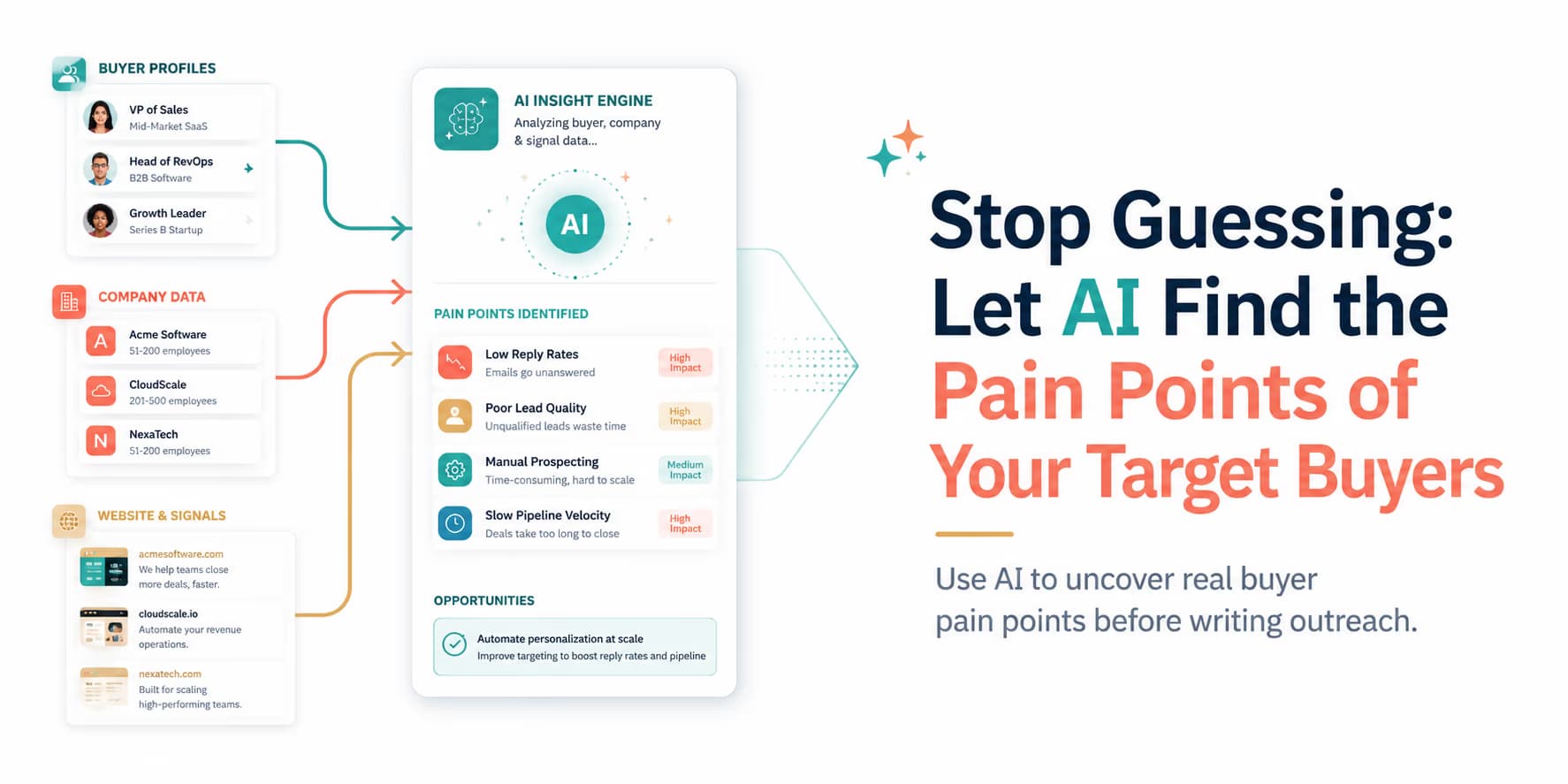
Outbound copy often starts as a guess. Teams write "optimize efficiency" or "reduce overhead" because they assume that is the pain. Those phrases do not name a real daily frustration, so they get ignored.
Replies come when the copy names the actual work: the bugs that interrupt the day, the reporting limits that slow people down, or the manual steps that eat the afternoon.
Doing that research by hand does not scale. AI agents can crawl reviews, docs, and forums and group the complaints so you can map pain programmatically.
Omentir uses live signals in that discovery layer so outreach copy stays tied to what buyers actually talk about.
The important caveat is that AI does not magically know a buyer's internal pain. It can collect public evidence, group repeated complaints, and suggest likely problems. A human still needs to decide whether that pain is relevant to the specific prospect, whether the source is reliable, and whether it belongs in outreach copy.
A good pain-point workflow should make you less presumptive, not more. Instead of saying, "You are probably struggling with deliverability," you can say, "Teams in this category often mention deliverability drops when they add outbound volume; is that something you are watching?" The first sounds like a guess. The second opens a useful conversation.
Pain points need evidence
Before using a pain point in sales copy, ask where it came from. Was it from a public review, a support forum, a job description, a sales call, a competitor comparison page, or your own customer interviews? Different sources carry different weight.
Use a simple evidence ladder:
- Strong evidence: Multiple buyers in the same segment describe the same workflow problem in their own words.
- Medium evidence: Public reviews, job posts, or forum threads suggest a recurring category-level problem.
- Weak evidence: One isolated complaint, a vague social post, or an inferred issue from website copy.
Strong evidence can shape positioning. Medium evidence can shape a diagnostic question. Weak evidence should trigger research, not a confident claim. This discipline keeps your outreach useful and protects your credibility.
Architecture of a pain-point discovery engine
A pain-point discovery engine scans online sources where buyers discuss their daily challenges.
A modern discovery engine coordinates three main steps:
- Crawling: Extracting discussion text from review platforms, developer docs, and forums.
- Sentiment analysis: Categorizing text blocks by emotion, isolating user complaints and frustrations.
- Clustering: Grouping similar challenges into core pain-point profiles.
Add two more steps before using the output: source scoring and human review. Source scoring tells the system how much to trust the evidence. Human review checks whether the pain maps to your product and whether it is safe to mention in outreach.
A useful extraction record should look like this:
Pain category: {manual list cleaning | CRM sync | pacing risk}
Source: {review | forum | job post | sales call notes}
Buyer role: {founder | SDR manager | RevOps}
Evidence quote: {short paraphrase or source snippet}
Confidence: high | medium | low
Safe outreach angle: {diagnostic question, not accusation}
This structure prevents the common mistake of turning raw complaints into aggressive copy. The output should give the copywriter context and restraint.
For details on web crawling infrastructure, see our analysis of modern outbound data stacks.
Crawling G2 and Capterra to identify competitor flaws
User review platforms are excellent sources of B2B pain-point data. When users share reviews on G2 or Capterra, they outline their specific dislikes about competitor tools.
Your discovery agent crawls these directories, searching for competitor profiles and isolating 1-star and 2-star reviews. The crawler extracts complaints about:
- Missing integrations: Users expressing frustration that a tool does not connect with their CRM.
- API failures: Developers noting frequent downtime or poor documentation.
- Pacing restrictions: Users complaining that a tool's high volume triggered platform bans.
This analysis lets you position your software as a direct solution to those complaints.
Review analysis needs context. A one-star review may come from a customer who was never a good fit. A complaint about price may not matter to your segment. A complaint about missing enterprise controls may be irrelevant if you sell to solo founders. Do not treat every negative review as market truth.
The best review mining looks for repeated language across similar buyers. If several sales operators complain about "manual cleanup before importing leads," that phrase is worth studying. If one person complains about an edge-case integration you do not plan to support, that may not belong in your campaign.
Also avoid attacking competitors directly. Instead of saying, "Your current tool is bad at pacing," write, "A lot of teams we talk to start watching pacing more closely once outbound volume increases." That keeps the conversation about the buyer's workflow, not a cheap competitor jab.
Mining forums and technical Q&A boards
Developer forums, Reddit directories, and Q&A boards are useful sources for technical B2B prospecting. On these sites, operators share their active bugs and request workarounds.
For example, scanning a community forum for outreach questions might reveal users asking how to manage connection limits on LinkedIn without manual tracking.
Your script saves this challenge and flags it as a campaign trigger.
Forums are especially useful because people describe problems before they become polished reviews. They ask for workarounds, compare tools, share failed attempts, and describe what they tried. That language is closer to the buyer's actual operating reality than most marketing copy.
But forums also contain noise. Some posts are outdated, some are from hobbyists, and some are from people outside your target market. Have the model classify the poster context where possible: founder, sales operator, engineer, agency owner, student, consultant, or unknown. A pain point from the wrong persona should not drive your outreach.
Save the exact buyer language separately from your interpretation. "We keep hitting pending invite limits" is buyer language. "They need an automated LinkedIn safety engine" is your interpretation. Keeping those separate helps you write copy that sounds like the market instead of your product page.
Cluster and score pain points
Once the system extracts complaints, group them into pain categories. Without clustering, you end up with a long list of isolated quotes. Clustering helps you see the pattern behind the comments.
For an outbound product, pain clusters might include:
- Lead quality: Too many poor-fit accounts, stale lists, or irrelevant contacts.
- Manual research: Reps spending too much time checking profiles, websites, and company context.
- Message quality: Templates sounding generic, robotic, or disconnected from the buyer's situation.
- Account safety: Worry about connection limits, pacing, spam reports, or profile restrictions.
- Follow-up handling: Replies getting lost, delayed, or mishandled after the first response.
Score each cluster by frequency, severity, buyer role, and product fit. A frequent pain that your product barely solves is not a good outreach angle. A less frequent pain from a high-value buyer segment may be worth prioritizing if your product solves it well.
Targeting rule: use specific terms
When drafting copy based on pain-point data, use the exact terms your buyers use. If they complain about "deliverability drops," use that phrase instead of "outbound delivery failures" to sound authentic.
Translating pain points into copy: the PSP framework
To turn pain-point data into conversions, structure your copy using the Problem-Solution-Proof (PSP) framework:
- Problem: Reference the specific user challenge identified by your discovery agent (e.g. "I saw your team is building out outbound infrastructure").
- Solution: Present your product as a direct answer to that issue ("Omentir handles pacing automatically").
- Proof: Include a verified metrics card ("helping teams scale pipelines while keeping sent volumes safe").
In cold outreach, soften the "Problem" line into an observation or question. You do not know the prospect has the problem until they confirm it. The best copy uses pain-point research to ask a smarter question.
Hi Jordan, saw your team is hiring for outbound roles.
Teams at that stage often start tightening lead quality before adding more volume.
Omentir helps review ICP fit and draft safer LinkedIn messages from one workflow.
Are reps doing prospect research manually today?
This copy is grounded in a pain pattern, but it does not accuse Jordan's team of having a broken process. It invites confirmation. That is the difference between useful personalization and overconfident automation.
For details on structuring this copy, see our guide to the B2B copywriting blueprint.
Scheduling campaigns safely to protect account health
Even with relevant copy, sending volume still matters. High outreach speeds will trigger automated spam filters.
To protect your sending profiles, route campaigns to a paced queue. Omentir enforces daily limits automatically. For pacing metrics, see our guide to safe social outreach campaign pacing.
Pain-point relevance does not excuse high-volume sending. If the research is good, spend it carefully. Start with narrow batches, review the drafted message, and compare replies by pain cluster. If lead-quality messages create better conversations than pacing messages, shift the next batch accordingly.
Keep a feedback loop from replies back to the pain library. When prospects confirm a problem, strengthen that cluster. When they reject an assumption, lower confidence or rewrite the angle. This keeps the system honest.
SOP: the automated pain-point extraction checklist
Implement this discovery workflow to map buyer challenges:
- Step 1: Scrape competitor profile pages on review sites monthly.
- Step 2: Filter out positive feedback, isolating user complaints.
- Step 3: Group these complaints by category (missing features, latency bugs, pricing limits).
- Step 4: Map these categories to campaign prompt templates in Omentir.
Add these review steps before the pain points enter live campaigns:
- Step 5: Score each pain by source quality, frequency, severity, and product fit.
- Step 6: Rewrite confident claims as diagnostic questions unless the prospect has stated the pain publicly.
- Step 7: Review reply data weekly and remove pain angles that create confused or irrelevant conversations.
Omentir fills those variables so the outreach stays tied to the pain you mapped.
Personalization from evidence, not guesses
Outbound works when it is timely and specific. AI crawlers can find real buyer pain so you stop guessing in the first line.
The best system does not invent pain. It gathers evidence, groups patterns, asks better questions, and learns from replies. If a "pain point" never appears in a real conversation, it does not belong in the next first line.
Frequently Asked Questions
By crawling public review boards (like G2 or Trustpilot), analyzing industry forums, and processing customer documentation to isolate recurring user challenges.
Reviewing complaints about competitor tools helps you identify specific features that frustrate users, letting you position your product as a direct alternative.
Omentir extracts buyer signals from prospect profiles, matches them to the pain points your software resolves, and drafts connection notes based on those details.
No. Senders can use Omentir's prompt configurations to query lead data, while growth engineers can use REST endpoints or hosted Model Context Protocol (MCP) tool schemas.