
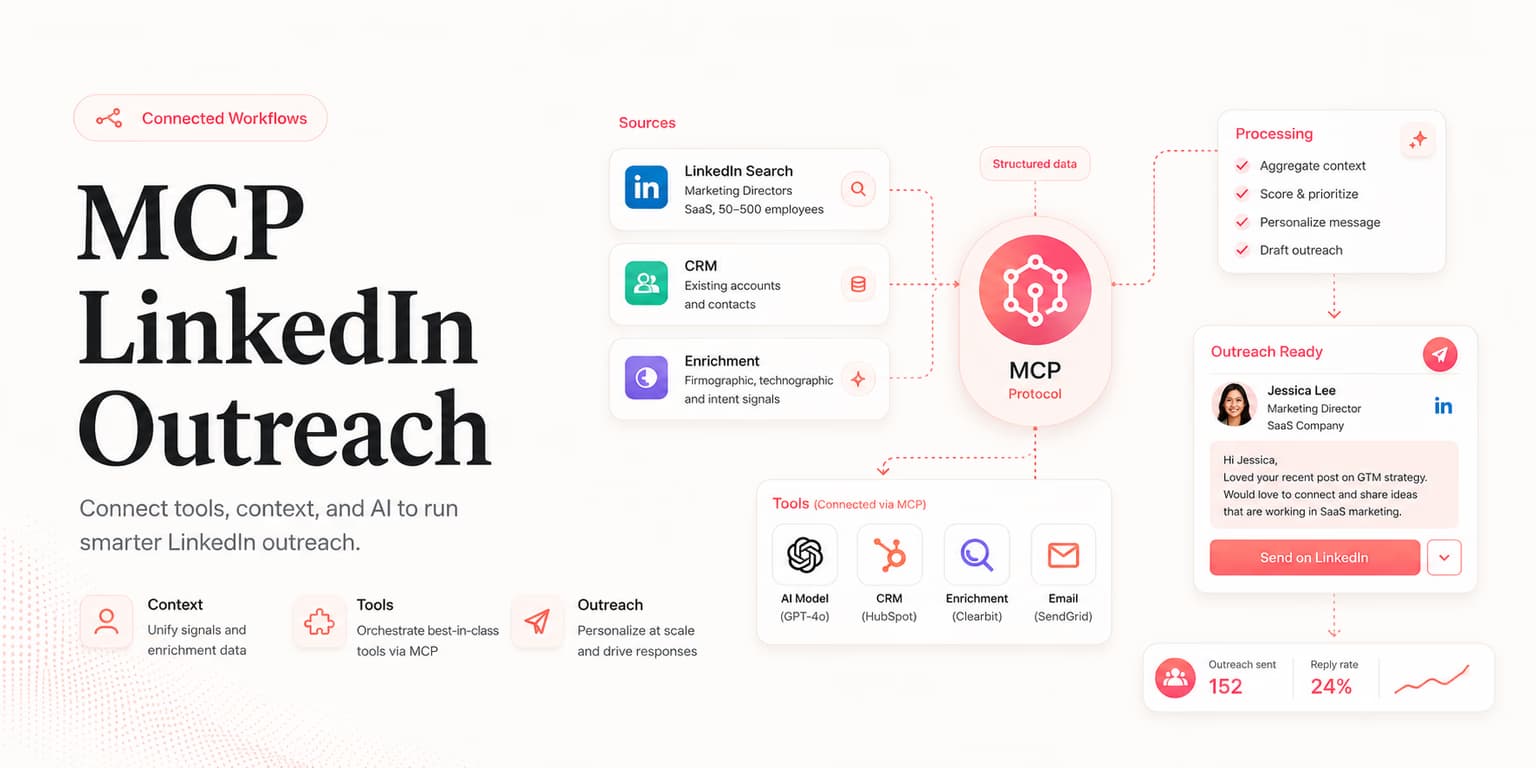
Model Context Protocol is useful for LinkedIn workflows because it gives an AI agent a controlled way to use sales tools. Instead of copying prompts between tabs, the agent can read the ICP, configure a finder, search and rank leads, retrieve exact lead context, inspect activity, and summarize existing replies.
The protocol is not the strategy. MCP does not make bad targeting good, and it does not make unsafe sending safe. It simply gives you a cleaner way to connect an agent to the workflow you have already decided to run.
The best MCP outreach system feels like a careful sales assistant, not an unsupervised spam engine. It should help you find the right prospects faster while keeping human judgment in charge of the account, the message, and the final send.
Why MCP matters
Most sales work is split across too many surfaces. A founder has a product note in one place, a lead list in another, a sequence tool somewhere else, and replies buried in an inbox. An agent can help only if it can see the right context and take bounded actions.
MCP gives the agent a tool menu. A well-designed server tells the agent what it can do, what inputs each action needs, and what result to expect. That turns vague instructions into repeatable operations.
For LinkedIn outreach, the important shift is from "write me a message" to "use the next approved discovery step." The public MCP workflow covers discovery, qualification, inspection of planned outreach, and review of existing replies. Campaign setup remains in the Omentir app.
Agents like Claude, ChatGPT, and OpenClaw can all be useful in different operating styles, but the underlying contract matters more than the agent brand. If the tools are too broad, the workflow is risky. If the tools are too narrow, the agent becomes a chatty dashboard.
The safe tool contract
A sales MCP server should expose tools in layers. The first layer reads context. The second configures discovery. The third changes limited live state. The safest default is to let agents inspect freely, then require explicit approval before they send a reply.
This layered design makes mistakes recoverable. If an agent misreads your ICP, it might produce a poor shortlist, but it has not messaged anyone yet. Outreach sequences are configured in the Omentir app, where the human reviews them before activation.
Tool outputs matter as much as tool names. A lead-listing tool should not return only names and profile URLs. It should return fit reasons, source group, confidence, missing data, and the next recommended action so the agent can explain its work.
The same applies to the scheduled-action view. It should show the queued lead, the exact planned time, the message or note, and any blocking reason so the user can review what Omentir will do.
When a tool returns structured evidence, the agent becomes easier to supervise. You can ask "why did you recommend these ten leads?" and get an answer grounded in returned fields rather than vague model memory.
- Context tools: read product profile, workspace readiness, connected LinkedIn status, lead groups, and planned outreach.
- Discovery tools: create an ICP discovery agent, list leads, list groups, and inspect why each lead matched.
- Configuration tools: update product context, discovery agents, and workspace safety settings.
- Safety tools: show quotas, identify missing setup, and inspect committed send times before activation.
- Conversation tools: list reply conversations and send an explicitly approved reply to an existing thread.
Keep campaign setup in Omentir
A good MCP workflow makes the agent prove lead quality before it earns a state-changing action. Omentir keeps campaign setup in its app, which prevents one chat instruction from becoming a visible campaign.
Brief to reply workflow
The cleanest MCP LinkedIn workflow starts with a sales brief. The agent should read your product profile, confirm the target buyer, and ask one or two clarifying questions if the ICP is too broad.
Once the brief is clear, the agent creates or updates a discovery process. It should not just return names; it should return people grouped by fit, signal, and risk. The output should be easy for a founder to approve in minutes.
After approval, set up the outreach sequence in the Omentir app. The human reviews the list and copy there, then activates it only if the campaign is ready. MCP can then inspect its planned sends rather than guessing when outreach will happen.
Replies complete the loop. The agent should monitor conversations, identify interested buyers, surface objections, and tell you which messages produced the best signals. That feedback becomes the next ICP adjustment.
- Brief: define buyer, pain, disqualifiers, and success criteria.
- Discover: find candidates and score them against the brief.
- Approve: review the shortlist before setting up outreach.
- Set up: create and review the outreach sequence in Omentir.
- Inspect: use scheduled actions to check committed send times and blockers.
- Activate: send only after human approval in Omentir.
- Review: use replies to improve the next batch.
Agent prompts that work
MCP tools do not remove the need for good prompts. The agent still needs a clear outcome, a bounded task, and a permission boundary. The prompt should tell the agent what to do, what not to do, and what output you expect.
Read my Omentir workspace context and product profile. Create a discovery plan for [buyer type] at [company type]. Find or prepare 25 candidate leads, score them against the ICP, and return the top 10 with fit reason, signal, risk, and recommended next action. Do not change any discovery settings until I approve the plan.
Once you approve the list and set up outreach in Omentir, use a second prompt to inspect what is scheduled.
List the scheduled actions for the approved lead group. Summarize each planned time, the lead, and any blocking reason. Do not send a reply or change settings without showing me the exact action first.
The language is plain, but it forces the right order: read context, find leads, score evidence, wait for approval, set up outreach in Omentir, then inspect the committed schedule.
Bad prompts to avoid
Bad prompts collapse too many steps into one instruction. "Find leads and message them" is not a workflow; it is an invitation for the agent to guess, skip review, and optimize for motion instead of quality.
Avoid prompts that demand maximum volume, hide disqualification rules, or ask the agent to invent personalization from weak data. If a message would embarrass you when shown back with your name attached, it should not be sent by an agent either.
For message strategy after the draft exists, pair this workflow with the connection request guide or the B2B outreach copywriting framework. Keep protocol design and copywriting as separate decisions.
Human-paced automation
The safest LinkedIn outreach does not try to maximize actions per hour. It tries to maintain a believable, relevant, human-paced rhythm from a real profile.
That means daily quotas, staggered actions, narrow targeting, and enough review that the messages still sound like you. A protocol can expose tools, but the sales system should enforce the pacing rules.
Use small batches until you know your acceptance and reply quality. If your agent finds 200 candidates, approve the best 20 rather than sending to all 200. A smaller list with visible reasons will teach you more than a large list with fuzzy fit.
Watch reply intent, not just response volume. "Not relevant" replies are a targeting problem. Confused replies are a message problem. No replies may be a signal problem, a profile problem, or simply a weak offer.
A safe MCP setup should make those diagnoses visible. Ask the agent to tag replies as interested, objection, wrong person, not now, confused, or negative. Then review the pattern weekly instead of judging the campaign from one memorable response.
If most replies are wrong-person replies, your lead discovery tool needs tighter title and responsibility filters. If most replies are confused, your draft messages probably rely on internal language that prospects do not use. If people are interested but not booking, your follow-up or scheduling handoff is the bottleneck.
Omentir MCP workflow
Omentir is designed so MCP-capable agents can operate lead discovery through a hosted MCP server or Agent API. The agent can read workspace context, update the product profile, configure discovery agents, search and filter leads, retrieve exact lead records, inspect activity, and work with existing reply conversations.
The important guardrail is that lead evidence stays reviewable. An agent can configure discovery and build a shortlist, while a human reviews the qualification logic before the lead moves into outreach. Automate repetitive research, but keep judgment visible.
If you are comparing operating styles, the OpenClaw LinkedIn leads guide explains how one agent interface can coordinate this workflow. The MCP layer is the shared contract underneath: the agent asks, the tool acts, and the system returns structured evidence.
The result is not "AI sends everyone a pitch." The result is a controlled sales loop where the agent helps you find ICP-fit buyers, prepare relevant outreach, and focus your time on warm replies.
FAQs
MCP is a standard way for an AI agent to discover and call external tools. In Omentir, that means reading workspace context, configuring lead finders, searching scored prospects, retrieving exact leads, inspecting activity, and reviewing existing reply conversations.
It can configure lead discovery, inspect scheduled outreach, and continue existing conversations. Campaign creation and activation stay in the Omentir app, and every reply should be explicitly approved before it is sent.
Use any MCP-capable agent you already trust for operational work. The important part is not the chat interface; it is the quality of the tools, permissions, prompts, and approval gates behind it.
It should separate read actions from writes, respect daily quotas, make every lead recommendation auditable, and keep campaign setup in the Omentir app before outreach begins.