
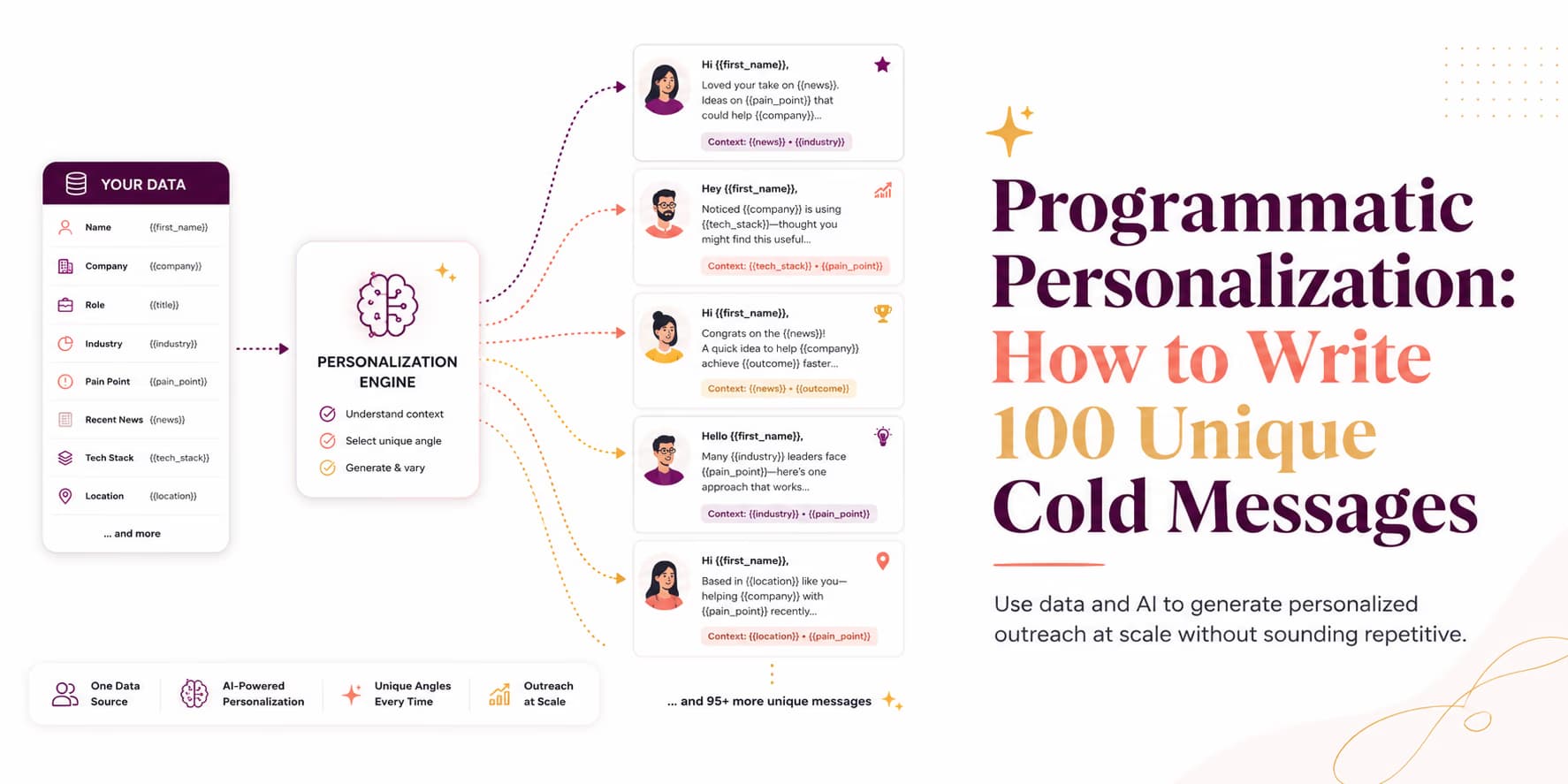
Programmatic personalization is what teams reach for when mail merge stops working. First name, company name, and job title are not personalization anymore; they are table stakes. Buyers can see the placeholder underneath the sentence.
Real personalization explains why this person is receiving this message now. It might reference their company's positioning, a current hiring signal, a product page, a recent role change, a public integration, or a problem that is specific to their segment. The detail should make the message more useful, not merely more decorative.
Manual research can produce that quality for a small account list. It breaks when you need to evaluate hundreds of accounts and still keep the work consistent. Programmatic personalization solves the workflow problem by collecting context, structuring it, drafting from it, and rejecting weak cases before they reach a prospect.
The goal is not to write 100 flashy messages as quickly as possible. The goal is to build a repeatable system that can produce 100 messages you would not be embarrassed to send from your own account. Omentir supports this kind of developer workflow through REST endpoints and a hosted Model Context Protocol (MCP) server, as outlined in our guide on configuring MCP tool setups. The rest of this article covers the architecture behind a safer personalization pipeline.
The programmatic personalization architecture
A programmatic personalization pipeline is a small decision system. It decides which prospects deserve research, which public evidence is useful, which message angle fits, and whether the final draft is safe to send. The LLM is only one part of that system.
Senders who pass entire raw HTML pages directly into a model usually get expensive, inconsistent output. The model sees navigation text, cookie banners, footer links, repeated boilerplate, and stale page copy. Clean architecture reduces that noise before drafting begins.
A practical pipeline has six steps:
- Discovery: Source prospect domains, LinkedIn URLs, roles, and companies from a defined ICP.
- Enrichment: Collect public website, profile, and company context that may explain relevance.
- Extraction: Convert messy text into structured evidence such as source URL, snippet, signal type, and confidence.
- Drafting: Ask the model to write from verified evidence and approved product context only.
- QA: Reject drafts that invent facts, overstate the signal, sound creepy, or lack a clear reason to reply.
- Delivery: Route approved drafts to a paced queue, not a bulk sender.
The extraction step is the difference between useful personalization and automated guesswork. A prompt that says "write a personalized message from this website" leaves too much room for interpretation. A prompt that receives "source URL, exact snippet, buyer role, safe angle, disallowed claims" has a much better chance of staying grounded.
For details on list sourcing, see our guide to generating sales leads from LinkedIn.
Extracting live context from company websites
To personalize a message, you need context that is accurate, current, and relevant to your offer. Not every public detail deserves to be in a cold message. A prospect's homepage tagline may help you understand the business, but it may not be a good opener. A hiring post may be a stronger signal if your product helps with the workflow described in the role.
When your script crawls a prospect's website, it should extract evidence from specific page types:
- Header Copy: Reveals how they pitch their product to their buyers.
- Value Propositions: Outlines the key outcomes they promote.
- Active Hiring: Identifies roles they are recruiting for.
- Integration Pages: Shows tools and workflows the company publicly supports.
- Security or Compliance Pages: Helps qualify enterprise readiness without guessing.
- Changelog or Product Updates: Reveals what the team is actively shipping or prioritizing.
Store the source beside every extracted detail. If your message says, "Saw your team is hiring for outbound operations," the system should know which page produced that conclusion. Source tracking makes QA possible and keeps the model from turning vague context into a confident claim.
Also distinguish evidence from interpretation. "The careers page mentions LinkedIn prospecting and weekly pipeline reporting" is evidence. "They need outbound automation immediately" is interpretation. Your pipeline can use the interpretation to suggest an angle, but the message should be written from the evidence.
Copyable TypeScript personalization script
A useful script does not need to be complicated. The core pattern is: accept a prospect, accept verified evidence, refuse weak evidence, and ask the model for a short message that stays inside the facts.
import { GoogleGenAI } from "@google/genai";

interface Prospect {
  name: string;
  company: string;
  domain: string;
  role: string;
}

interface Evidence {
  sourceUrl: string;
  snippet: string;
  signalType: "hiring" | "positioning" | "integration" | "role_based";
  confidence: "low" | "medium" | "high";
}

const ai = new GoogleGenAI({ apiKey: process.env.GEMINI_API_KEY });

async function generateMessage(prospect: Prospect, evidence: Evidence): Promise<string> {
  if (evidence.confidence === "low" || evidence.snippet.length < 40) {
    throw new Error("Evidence is too weak for personalized outreach.");
  }

  const response = await ai.models.generateContent({
    model: "gemini-2.5-pro",
    contents: [{
      role: "user",
      parts: [{
        text: `Write a short LinkedIn message from a founder to a prospect.
        - Prospect: ${prospect.name}
        - Role: ${prospect.role}
        - Company: ${prospect.company}
        - Public evidence: ${evidence.snippet}
        - Evidence source: ${evidence.sourceUrl}

        Rules:
        1. Keep it under 70 words.
        2. Reference only the public evidence above.
        3. Do not claim private knowledge.
        4. Ask one low-pressure question.
        5. Return only the message text.`
      }]
    }]
  });

  return response.text ?? "";
}
This is not a full production system, and it should not be treated as one. It shows the core guardrail: the model does not receive a giant pile of raw context. It receives a specific evidence object and rules that prevent it from overreaching.
In a real workflow, add logging for rejected evidence, source URLs, prompt versions, model output, and reviewer decisions. Those logs are how you improve the campaign. If the model keeps rejecting a segment because evidence is weak, the targeting may need to change before the writing does.
Engineering rule: set up variable fallbacks
Your script needs to handle missing context fields. If a web crawl fails, define a fallback variable (such as using their job title and company sector) to write a clean message.
Handling stale data and empty variable fallbacks
Web crawlers will occasionally fail. Sites change structure, block automated requests, hide pages behind scripts, or return thin content that teaches you nothing. Profile data can be incomplete too. If your pipeline treats every missing field as usable, the model will produce brittle copy.
Fallbacks should be designed by signal strength. Strong public evidence can support a specific opener. Medium evidence can support a softer question. Weak evidence should fall back to role-based copy or reject the prospect for now.
- Strong fallback: "Saw your careers page mentions LinkedIn prospecting and pipeline reporting."
- Medium fallback: "Looks like your team is building out outbound operations."
- Role-based fallback: "Curious how you are handling prospect sourcing as the team grows."
- Reject: No clear ICP fit, no useful signal, or no confident buyer role.
The reject path is important. Many personalization systems fail because they force every lead into a message. That is how you get copy that sounds polished but empty. A good programmatic pipeline should be willing to say, "not enough evidence to personalize well."
To prevent errors, validate variables before running prompts. If a crawl returns empty results, switch to a safer prompt or hold the account for manual review. Do not ask the model to compensate for missing truth with creativity.
Routing campaigns safely to avoid account bans
Generating 100 personalized messages is the easy part. Sending them safely is the part that determines whether the workflow can survive. High volume, stacked campaigns, and unnatural timing can damage sender reputation even when the messages are individually well written.
Route drafts to a paced delivery queue instead of sending directly from the script. A delivery system should enforce daily budgets, space actions naturally, stop follow-ups when a prospect replies, and make it easy to pause a campaign if quality signals drop.
Omentir is built around daily quotas and human-paced LinkedIn outreach. The API and MCP workflow lets agents configure lead finders, inspect scored leads and activity, retrieve exact lead context, and reply within existing threads. Read more about safety setups in our guide on pacing LinkedIn outreach campaigns.
The safest operating rule is to separate generation from delivery. A script can create draft candidates quickly. The sending layer should decide what actually leaves the account, when it leaves, and whether a human needs to review it first.
SOP: running your first programmatic campaign
Implement these steps to run a programmatic campaign without turning it into a bulk-blast machine:
- Step 1: Define one ICP and one offer. Do not test five segments at once.
- Step 2: Source target company domains and LinkedIn profiles from that ICP.
- Step 3: Crawl only pages likely to contain useful buying context.
- Step 4: Extract sourceable evidence into a structured schema before drafting.
- Step 5: Generate drafts with strict product facts, disallowed claims, and fallback rules.
- Step 6: Review the first batch manually and reject weak personalization.
- Step 7: Route approved drafts to a paced campaign workflow.
- Step 8: Inspect replies and rejected drafts before increasing volume.
Omentir can help manage the discovery, campaign, conversation, and pacing pieces around this workflow. Your team still owns the judgment: which evidence is good enough, which messages deserve to be sent, and when to stop.
Scale only after the drafts hold up
Outbound campaigns do not require you to choose between quality and scale, but you do have to design the system around quality first. If you automate a weak template, you get weak outreach faster. If you automate evidence collection, draft review, and paced delivery, you get a workflow that can grow without losing the reader.
Start with a small batch. Review every source, every draft, and every reply. Once the system consistently produces messages that feel specific, truthful, and easy to answer, raise volume in controlled steps.
The best use of programmatic personalization is not making outreach feel automated. It is making good research and thoughtful writing repeatable. If the variable is only first name and company, you do not have a program. You have a template.
Frequently Asked Questions
It is the practice of using custom scripts and API waterfalls to crawl prospect profiles, score business context, and generate unique outreach copy for every contact.
You must ground the prompt in verified inputs (such as website HTML extracts) and instruct the model to only use details present in the text, setting strict negative constraints against generic buzzwords.
Yes. Omentir provides REST endpoints under /api/agent/v1 and a hosted Model Context Protocol (MCP) server for workspace context, discovery agents, searchable scored leads, activity, existing conversations, and replies.
There is no universal safe number. Keep volume conservative, account for sender history, avoid overlapping campaigns, and route messages through human-paced queues with daily quotas.