
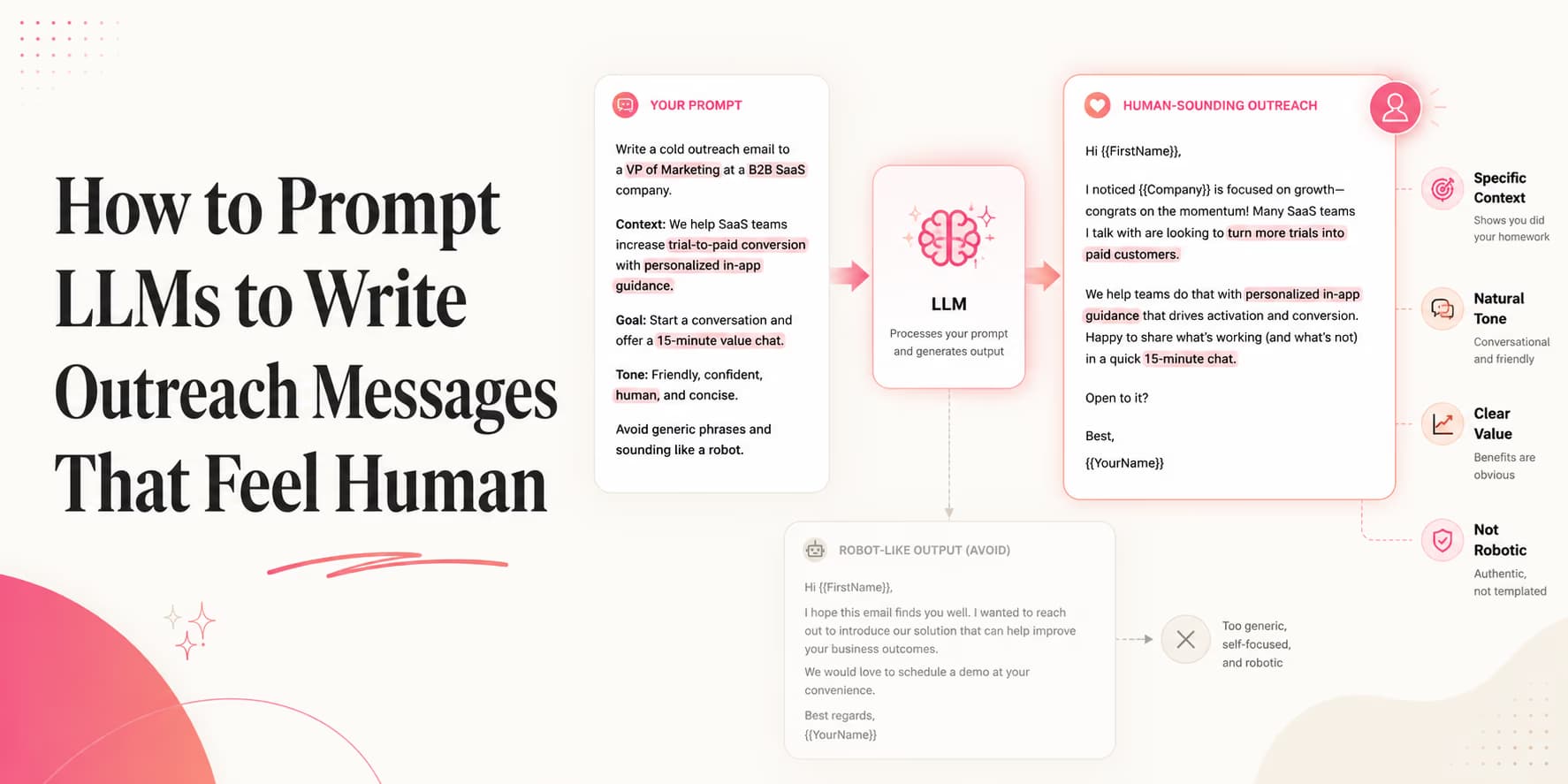
B2B buyers are flooded with automated messages. When prospects open their inboxes, they can identify AI-generated pitches instantly. Robotic greetings, exaggerated value claims, and corporate transitions make messages look identical.
To get responses, your campaigns must sound authentic. Senders need to write copy that reads as if it was written by an in-house sales leader.
Achieving this at scale does not require manual writing. By using prompt constraints, negative lists, and styling settings, you can instruct language models to write human-sounding copy.
Omentir helps manage this copywriting flow, running your prompts against target profiles and holding drafts for review. Here is how to configure those prompts.
Why models sound fake by default
Most language models are trained to be helpful, complete, and polished. Those instincts are useful for documentation, but bad for cold outreach. A model tries to explain the whole value proposition, soften every sentence, and end with a polished call to action.
Human outreach works differently. A real person writes with context, restraint, and imperfection. They do not explain every benefit in the first message. They make one observation, ask one reasonable question, and leave room for the prospect to respond.
Your prompt needs to fight the model's default habits. Do not ask it to "write a compelling pitch." Ask it to write a short peer-to-peer opener using one verified signal and one low-friction question.
The grammar and style rules of human outreach
Human sales professionals write peer-to-peer messages. They do not write formal essays with multiple paragraphs and complex structures.
To make your AI copy read naturally, enforce these styling rules:
- Short Paragraphs: Keep paragraphs under two or three sentences. Long blocks of text look overwhelming in chat windows.
- Simple Punctuation: Avoid excessive exclamation marks, semi-colons, and bold font highlights.
- Direct Openings: Eliminate introductory transitions and state your reason for reaching out immediately.
For details on B2B LinkedIn opener structures, see our guide to writing B2B openers that convert.
A useful style rule is "one thought per sentence." If a sentence tries to mention the trigger, the pain, the product, and the next step, it will sound like a pitch. Split it or cut it.
Negative prompting: words and transitions to ban
The most effective way to eliminate robotic phrasing is negative prompting. This involves listing specific words and patterns the LLM must reject.
Ban these buzzwords from your campaigns:
- "Revolutionize," "supercharge," "seamless," "next-generation," or "delighted."
- Introductory greetings like "I hope this finds you well" or "In today's fast-paced digital" "landscape."
- Exaggerated value statements promising immediate revenue growth without proof.
Negative prompting should include patterns, not just words. Ban "I wanted to reach out because," "quick question," "circle back," and "just checking in" if your drafts keep using them. These phrases are not always wrong, but they often signal that the model is falling back to generic sales language.
Copyable LLM copywriting prompt blueprint
Use the prompt template below to write direct, human-sounding B2B outreach copy:
You are an expert sales writer. Write a B2B outreach message based on:
- Prospect: {prospect_name}
- Company: {company_name}
- Trigger: {buyer_signal}
- Product: {product_profile}

Rules:
1. Limit to under 75 words.
2. Open directly by referencing {buyer_signal}. Do not use introductory fluff.
3. Transition into a single problem solved by {product_profile}.
4. Do not use words like "supercharge," "seamless," or "revolutionize."
5. Conclude with a conversational question.
This prompt forces the engine to output concise, relevant copy.
Bad output vs better output
The easiest way to train your prompting taste is to compare outputs. Here is the difference between AI slop and a usable first draft.
Bad output
I hope you're doing well. I wanted to reach out because Omentir can revolutionize your outbound workflow and help your team seamlessly scale lead generation. Would you be open to a quick call?
Better output
Saw your team is hiring SDRs in Austin. Are you already scoring LinkedIn leads before reps start sending, or is that still manual?
The better version does less. It uses one signal, avoids the product monologue, and asks a question the buyer can answer in one sentence.
Copywriting Rule: Check for Case Variance 💡
Instruct your prompt loop to write variables in standard casing. Inserting names in ALL CAPS (like "Hi JOHN") makes automation obvious, resulting in immediate opt-outs.
Grounding prompts in verified prospect context
To write relevant copy, you must ground your prompts in verified details. Senders pull triggers from websites and careers board posts, as detailed in our analysis of how AI crawlers analyze B2B websites.
This context ensures your messages address the prospect's active operational needs.
Do not let the model infer sensitive or unverifiable details. If the prompt says "they are probably struggling with pipeline," the model may write that as a fact. Instead, label signals carefully: "visible signal: hiring SDRs" and "possible implication: outbound process may be expanding." The draft should reference the visible signal, not the guess.
The five prompt slots
A reliable outreach prompt has five slots. Keep them explicit so the model does not invent missing context.
- Sender identity: founder, operator, sales lead, or teammate.
- Prospect role: the person receiving the message and the workflow they own.
- Verified signal: the fact you are allowed to mention.
- Relevant problem: the pain connected to that role and signal.
- Low-friction ask: a question, resource offer, or permission-based next step.
If one slot is empty, the model should return "needs more context" rather than writing anyway. That failure mode is a feature, not a bug.
Enforcing human pacing and deliverability safety
Writing human-sounding copy is only the first step. Senders must manage delivery pacing to protect account safety.
Omentir handles pacing automatically, restricting campaigns to safe daily limits. For safety quotas, see our guide on pacing LinkedIn outreach campaigns.
Human-sounding copy still creates risk if it is sent like a machine. Review the first batch manually, read the replies, and slow down if people object to relevance. Message quality and pacing work together.
Human review rubric
Before approving a batch, score each draft with four yes/no checks. Would I send this from my own profile? Is the referenced signal real? Is the ask easy to answer? Would the prospect understand why I chose them?
If a draft fails any check, edit or reject it. Do not let "mostly fine" messages through at scale. Small awkwardness becomes obvious when 100 prospects receive variations of the same weak pattern.
Iterate prompts from real replies
Prompt improvement should come from replies, not from internal opinions. After each campaign batch, read the positive replies, the objections, and the ignores. Look for language prospects use naturally. That language is usually better than whatever the model invented.
If buyers keep asking "what does this actually do?", your prompt is too abstract. Add a rule requiring one concrete workflow. If buyers reply with "not relevant," your signal or ICP slot is too weak. If buyers say "send it over," your low-friction ask is working and you can test a slightly more specific follow-up.
Save the best human-edited drafts as examples. The next prompt version should include two or three examples of approved style and two examples of rejected style. Models learn the boundary faster when they can see what "good" and "bad" look like in your market.
Update rule: "Use buyer language from replies when available. Prefer words the prospect used over abstract product vocabulary."
For example, if three buyers describe the problem as "list cleanup" but your product profile says "autonomous lead qualification," prompt the model to use "list cleanup" in the opener. Buyer language lowers friction because the prospect does not need to translate your category into their daily workflow.
Keep one final prompt rule at the bottom of every template: "If this sounds like a marketing email, rewrite it as a short note from one operator to another." That single instruction often removes the glossy layer that makes AI outreach feel fake.
SOP: the prompt output audit checklist
Audit your campaign drafts using these steps:
- Step 1: Run a test batch of 10 drafts using your prompt templates.
- Step 2: Check copy for buzzwords and introductory transitions.
- Step 3: Verify that variable inputs are formatted in standard casing.
- Step 4: Route the approved prompts to Omentir's campaign builder.
- Step 5: Reject any draft that uses a guessed pain as if it were a verified fact.
- Step 6: Save the best human-edited examples and use them to improve the next prompt version.
Omentir automates variable updates, keeping your campaigns personalized and safe. Your job is to keep the prompt honest and the review standard high.
Prioritizing relevance over mass volume
Outbound campaigns do not require you to choose between quality and scale. By configuring prompt constraints and negative lists, you can write human-sounding copy for every prospect.
The best prompt is not the one that sounds clever. It is the one that helps a buyer immediately understand why the message belongs in their inbox, using only facts you would be willing to say on a call.
Frequently Asked Questions
Standard LLM settings favor formal transitions, long sentences, and corporate greetings (like "I hope this email finds you well") which humans rarely use in peer-to-peer messages.
It is the practice of explicitly instructing the LLM to avoid specific buzzwords (quoted in the list below) and banning standard introductory transitions to keep copy direct.
Omentir runs prompts grounded in your product facts, references specific buyer signals from target profiles, and routes drafts to a review queue for human approval.
Keep messages under 75 words. Short, direct copy is easy to read in chat-native interfaces and drives higher reply rates.